
FreeBSD 15 on a MacBook Pro Mid-2012
Setup notes for FreeBSD 15.1-RELEASE-p3 on a MacBookPro9,2 (A1278), hostname
zippy. Covers the trackpad, display and GPU, screen brightness, keyboard
backlight, function keys, audio, WiFi, lid close and KDE Plasma 6.
Two things do not work and are not fixable on this hardware: the built-in Broadcom BCM4331 WiFi (no firmware support — use a USB adapter, see step 9) and S3 sleep (the machine does not resume — see step 11 for the lid-close workaround).
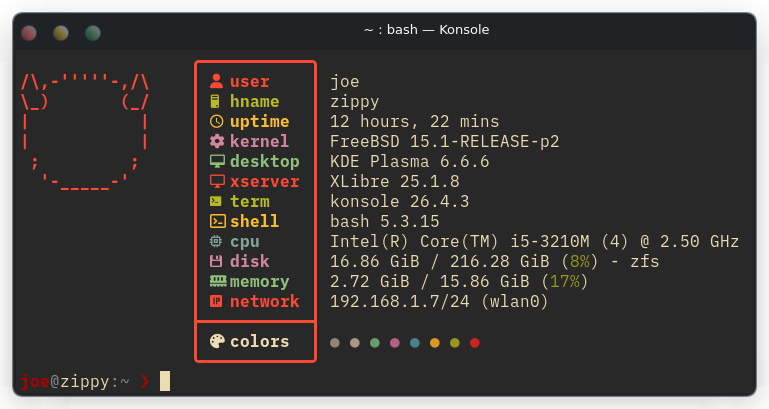
fastfetch in Konsole on the finished Plasma 6 session.Hardware Overview
| Component | Hardware | Driver | Status |
|---|---|---|---|
| CPU | Intel Core i5-3210M (Ivy Bridge, 2.5GHz, 2c/4t) | cpufreq | Working |
| GPU | Intel HD Graphics 4000 | i915kms | Working |
| RAM | 16GB DDR3 | — | Working |
| Disk | ~900GB HDD (SATA) | ahci | Working |
| Audio | Cirrus Logic CS4206 (Intel Panther Point HDA) | snd_hda | Working |
| Trackpad | Apple Wellspring5A (USB 0x05ac:0x0252) | wsp + libinput | Working (gestures) |
| Keyboard | Apple USB (composite with trackpad) | ukbd / evdev | Working |
| Screen Backlight | Intel Panel | /dev/backlight/intel_backlight0 | Working |
| Kbd Backlight | Apple SMC | asmc | Working |
| Ethernet | Broadcom BCM57765 | bge | Working |
| WiFi (USB dongle) | NetGear A6100 (Realtek RTL8821AU) | rtwn | Working — 2.4 & 5GHz |
| WiFi (built-in) | Broadcom BCM4331 | bwn (no firmware) | Not Supported |
| Webcam | Apple FaceTime HD | webcamd | Working |
| SMC | Apple System Management Controller | asmc | Working |
| Bluetooth | BCM2046 | — | Partial |
| S3 Sleep | — | — | Broken — do not use |
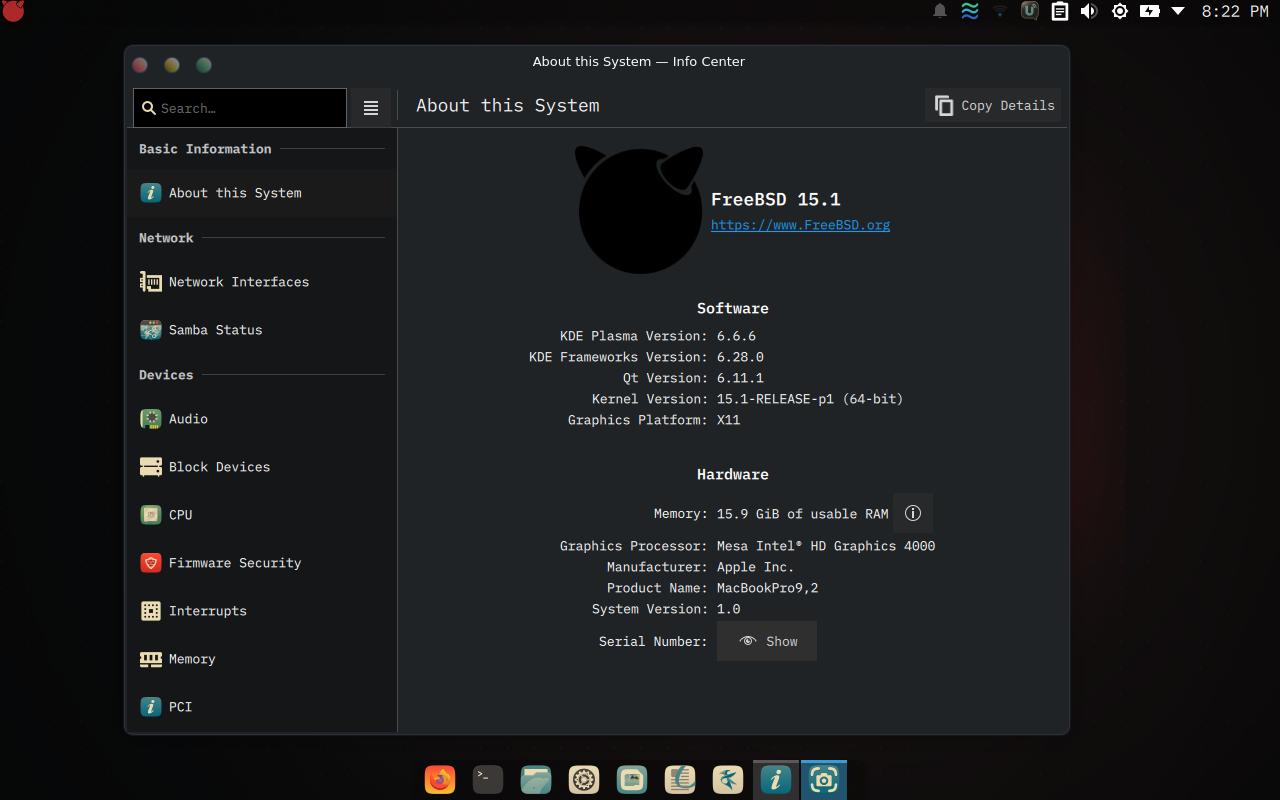
Product Name: MacBookPro9,2 and the Intel HD 4000 on the Mesa driver.What Works
| Feature | Notes |
|---|---|
| Trackpad — tap, scroll, gestures | Requires hw.usb.usbhid.enable=0 + libinput — see step 1 |
| Keyboard (all keys) | evdev driver for kbdmux fixes X responsiveness |
| F1/F2 — Screen brightness | KDE Powerdevil → /dev/backlight/intel_backlight0 — do not bind in xbindkeys, see step 4 |
| F5/F6 — Keyboard backlight | Via dev.asmc.0.light.control sysctl + xbindkeys script |
| F7/F8/F9 — Media keys | playerctl via xbindkeys |
| F10/F11/F12 — Volume + OSD | KDE kglobalaccel → PulseAudio → plasma-pa OSD |
| F3 — Konsole, F4 — Dolphin | XF86Launch1 → konsole, XF86LaunchA → dolphin, via xbindkeys |
| Ctrl+Alt+Fn VT switching | xkbcomp preserves XF86Switch_VT_N at XKB level 5 |
| Audio — speakers, headphones | Auto-detected, no config needed |
| WiFi 2.4GHz + 5GHz | NetGear A6100 USB dongle (rtwn driver) |
| GPU acceleration | i915kms — KDE Plasma runs smoothly |
| X server — X.Org or XLibre | Both run this hardware cleanly; XLibre is a drop-in alternative — see step 12a |
| Lid close → screen blank | UPower DBus watcher + xset dpms — see step 11 |
| Webcam | webcamd userspace driver |
| Ethernet | bge0 — auto-detected |
| Power management | powerd adaptive mode |
| Cool idle temps (~48–51°C) | Requires performance_cx_lowest="Cmax" — FreeBSD's AC default stays in C1 and idles ~10°C hotter — see step 10 |
hw.acpi.lid_switch_state=S3 or any sleep/hibernate
actions in KDE Powerdevil.
1. Trackpad Fix — hw.usb.usbhid.enable=0
This is the most important fix. Understanding why it works will help you diagnose regressions.
The Problem
The Apple keyboard/trackpad is a single composite USB device
(0x05ac:0x0252) with three HID interfaces:
USB Device 0x05ac:0x0252 (Wellspring5A ANSI)
├── Interface 0   HID Keyboard      (bInterfaceProtocol=0x01)
├── Interface 1   HID Touchpad      (bInterfaceProtocol=0x00)  <-- wsp needs this
└── Interface 2   HID Consumer Ctrl (bInterfaceProtocol=0x00)
FreeBSD has wsp, a driver written specifically for Apple trackpads
— and 0x0252 is in its device table. But it never bound.
wsp is a uhub-level driver — it probes at the raw
USB layer. usbhid is a bridge driver that by default claims
every HID-class interface first, creating a hidbus for each one. Once
usbhid claims Interface 1, the generic hms (basic mouse) driver
attaches to the hidbus — and wsp never gets to probe at all. Result:
basic mouse, no gestures, no /dev/wsp0.
hms.ko via devmatch_blacklist only stops devmatch
from autoloading it. usbhid still claimed Interface 1 and created the
hidbus. Without hms, the trackpad had no driver at all —
wsp still wasn't reached because usbhid was still in the way.
The Fix
/boot/loader.confhw.usb.usbhid.enable=0With usbhid disabled, the USB layer handles each interface directly:
With hw.usb.usbhid.enable=0 (working):
USB Device 0x05ac:0x0252
├── Interface 0 → ukbd1  → keyboard input ✓
├── Interface 1 → wsp0   → /dev/wsp0 → moused → /dev/sysmouse ✓
└── Interface 2 → (none) → brightness/backlight via ACPI/SMC still works ✓

Without it (broken default):
USB Device 0x05ac:0x0252
└── usbhid → hidbus
    ├── hkbd1  (keyboard) ✓
    ├── hms1   (trackpad = basic mouse only, no gestures) ✗
└── hcons0 (consumer control / media keys) ✓acpi_video via
ACPI events, and keyboard backlight by asmc. Neither goes through
hcons or usbhid.
Verify It Worked
dmesg | grep wsp
# Expected: wsp0 on uhub5
#           wsp0: <Apple Inc. Apple Internal Keyboard / Trackpad> on usbus2

ls /dev/wsp0 # should exist
rc.conf — moused
/etc/rc.confdevmatch_blacklist="ums.ko bcm5974.ko"
moused_enable="YES"
moused_port="/dev/wsp0"
moused_flags="-t auto"X11 Touchpad Config — libinput
/usr/local/etc/X11/xorg.conf.d/20-apple-touchpad.confSection "InputClass"
Identifier "Apple Trackpad"
MatchProduct "Apple Inc. Apple Internal Keyboard / Trackpad"
Driver "libinput"
Option "Tapping" "on"
Option "TappingButtonMap" "lrm"
Option "NaturalScrolling" "true"
Option "ScrollMethod" "twofinger"
Option "ClickMethod" "clickfinger"
Option "DisableWhileTyping" "true"
EndSection
# Prevent libinput from trying to open /dev/wsp0 directly — moused owns it
# and libinput segfaults (null deref) instead of returning "device busy"
Section "InputClass"
Identifier "Ignore wsp0"
MatchDevicePath "/dev/wsp0"
Option "Ignore" "true"
EndSectionTappingButtonMap lrm: 1-finger tap = left, 2-finger tap = right, 3-finger
= middle. Physical 2-finger click = right click. The second block matters even though
wsp isn't fighting usbhid for the device — without it,
libinput crashes Xorg with SIGSEGV whenever it probes /dev/wsp0 while
moused already holds it.
wsp Sensitivity Tuning
/etc/sysctl.confhw.usb.wsp.enable_single_tap_clicks=1
hw.usb.wsp.pressure_tap_threshold=25
hw.usb.wsp.pressure_untouch_threshold=20
hw.usb.wsp.z_factor=6 # scroll speed (lower = slower)
hw.usb.wsp.scale_factor=6 # cursor speed (higher = faster)wsp must claim the USB
interface at boot before usbhid could load.
Recurring Issue — USB Disconnect After Days of Uptime
After several days of uptime the trackpad goes dead — even at the SDDM login
screen, before any user session starts. If it happens mid-session, Xorg can crash
outright (SIGABRT on device removal), which can crash-loop kwin/plasmashell
and, if the saved KWin session has stale window entries, respawn a storm of Konsole
windows on every crash-loop restart.
Root cause: the SMSC 2.0 hub (ugen2.3, vendor
0x0424 product 0x2513) that hosts the internal Apple devices on
usbus2 enters pwr=SAVE (USB autosuspend) and eventually drops
the trackpad (ugen2.9, vendor 0x05ac product
0x0252) entirely. Per usbconfig(8), power_save is
the default for all USB hubs — nothing has to go wrong first, the
hub starts every boot in this state.
dmesg.boot
shows them attaching around Root mount waiting for: usbus2) — well
before devd itself starts as an rc.d service. devd never sees that first
ATTACH event, so a devd rule is reactive only (catches a later genuine detach/reattach)
and does nothing to stop the hub drifting into SAVE on every boot.
Fix, part 1 — boot-time rc.d script (does the real work)
/usr/local/etc/rc.d/apple_usb_power#!/bin/sh
#
# PROVIDE: apple_usb_power
# REQUIRE: FILESYSTEMS
# KEYWORD: nojail
. /etc/rc.subr
name="apple_usb_power"
rcvar="apple_usb_power_enable"
start_cmd="apple_usb_power_start"
apple_usb_power_start()
{
for dev in $(usbconfig list | cut -d: -f1); do
desc=$(usbconfig -d "${dev}" dump_device_desc 2>/dev/null)
if echo "${desc}" | grep -q "idVendor = 0x0424" && \
echo "${desc}" | grep -q "idProduct = 0x2513"; then
usbconfig -d "${dev}" power_on
fi
if echo "${desc}" | grep -q "idVendor = 0x05ac" && \
echo "${desc}" | grep -q "idProduct = 0x0252"; then
usbconfig -d "${dev}" power_on
fi
done
}
load_rc_config $name
run_rc_command "$1"Matches devices by vendor:product ID rather than a hardcoded ugen name, so
it survives renumbering across reboots. Enable and test:
sudo chmod 555 /usr/local/etc/rc.d/apple_usb_power
sudo sysrc apple_usb_power_enable="YES"
sudo service apple_usb_power start
sudo usbconfig list | grep -E "ugen2\.[39]" # hub should now show pwr=ONrcorder places this right after FILESYSTEMS, well before SDDM
starts — verify with rcorder /usr/local/etc/rc.d/apple_usb_power /etc/rc.d/*.
Fix, part 2 — devd rule (secondary, catches genuine runtime reconnects)
/usr/local/etc/devd/apple-usb-power.confnotify 100 {
match "system" "USB";
match "subsystem" "DEVICE";
match "type" "ATTACH";
match "vendor" "0x0424";
match "product" "0x2513";
action "usbconfig -d $device-name power_on";
};
notify 100 {
match "system" "USB";
match "subsystem" "DEVICE";
match "type" "ATTACH";
match "vendor" "0x05ac";
match "product" "0x0252";
action "usbconfig -d $device-name power_on";
};If it disconnects again despite both fixes
sudo usbconfig list | grep -E "ugen2\.[39]" # check current pwr= state
sudo service apple_usb_power start # force power_on immediately
sudo service moused restart
sudo service sddm restart # if Xorg crashedIf power_on still doesn't hold across days, add
hw.usb.no_suspend_wait=1 to /etc/sysctl.conf as a more
aggressive suspend-prevention measure. If Xorg crashing triggers a KWin crash-loop, a
bloated saved session (~/.config/session/kwin_saved*) can respawn dozens of
Konsole windows on every restart — fix with pkill -9 -u joe konsole
then clear/trim that session file.
2. Display / GPU — i915kms
Intel HD Graphics 4000 (Ivy Bridge) via the i915kms Linux KMS
compatibility driver. GPU acceleration works for KDE Plasma 6.
i915kms_load="YES"On boot you'll see the VT switch from efifb to drmfb in dmesg
— this is normal. Xorg requires /dev/dri/card0 which this module
creates; without it X fails with a fatal error at a black screen.
modesetting driver with glamor acceleration (confirmed in the Xorg log).
The legacy xf86-video-intel DDX driver gets installed as part of the
xorg metaport (see step 12) but is not what actually drives this GPU.
Major Version Upgrades — drm-kmod Breakage
i915kms is not part of base — it ships in the
graphics/drm-66-kmod package, built against one specific kernel ABI
(__FreeBSD_version / kern.osreldate). A
freebsd-update version bump (e.g. 15.0 → 15.1) installs a new kernel but
does not touch /boot/modules/*.ko — those come from
pkg, not freebsd-update.
freebsd-update install + reboot into the
new kernel. Recovery requires single-user mode to disable the module before the system
boots normally again.
1 — In single-user mode, disable i915kms so the box boots
sysrc -f /boot/loader.conf -x i915kms_load
sysrc kld_list=""Reboot to confirm the stale module was the cause — you'll be back to multi-user,
but with no GPU driver: Xorg fails with open /dev/dri/card0: No such file or
directory (expected, no black-screen mystery).
2 — Finish the freebsd-update upgrade
A panic on first reboot usually means you're mid-upgrade (kernel installed, userland not yet):
freebsd-version -k # kernel version
freebsd-version -u # userland version — if these differ, finish the upgrade:
sudo freebsd-update install
sudo pkg update -f
sudo freebsd-update install # second pass, installs userland3 — Get a kernel-matched drm-kmod build
pkg upgrade alone will likely report drm-kmod as "up to date" even when it
isn't. drm-66-kmod is provided by two repos — the
general FreeBSD-ports repo (lags behind, keeps an older build) and
FreeBSD-ports-kmods (tracks the current kernel ABI). Plain pkg
upgrade can silently pick the stale one.
sysctl kern.osreldate # e.g. 1501000
pkg info drm-66-kmod | grep FreeBSD_version # must match osreldate above
pkg rquery -r FreeBSD-ports-kmods "%n %v" drm-66-kmodIf the installed FreeBSD_version doesn't match
kern.osreldate, force it explicitly:
sudo pkg upgrade -r FreeBSD-ports-kmods drm-66-kmod drm-kmod4 — Re-enable and test
No fresh reboot needed to test — kldload does the same attach as
boot-time loading, and lets you watch dmesg live instead of guessing from a
cold boot:
sudo kldload i915kms
dmesg | tail -20 # look for "[drm] Initialized i915 ..." and "Replacing driver efifb with drmfb"
ls /dev/dri/ # card0 should exist
sudo service sddm restartOnce confirmed working, make it permanent:
sudo sysrc -f /boot/loader.conf i915kms_load="YES"
sudo sysrc kld_list="i915kms"freebsd-update that bumps the kernel version,
drm-kmod needs to be re-matched via pkg upgrade -r FreeBSD-ports-kmods
drm-66-kmod before re-enabling i915kms_load — don't
just re-enable the old config and reboot, it'll panic again.
3. Keyboard Fix — evdev for kbdmux
The keyboard works fine in TTY but feels laggy in X. The cause: libinput applies
debounce/fuzz filtering to the kbdmux (keyboard multiplexer) device, making
keys feel sluggish and unresponsive.
Fix: force the evdev driver for the kbdmux device instead of libinput.
Section "InputClass"
Identifier "kbdmux evdev"
MatchProduct "System keyboard multiplexer"
Driver "evdev"
EndSection# KBDMUX(2) + HID_MOUSE(4) + HID_KBD(8) = 14
kern.evdev.rcpt_mask=14Ctrl+Alt+Fn VT switching. SYSMOUSE(1) is intentionally excluded
— moused feeds /dev/sysmouse directly, so including it would cause
double mouse events.
4. Screen Brightness — Intel Backlight Device
Brightness is controlled via /dev/backlight/intel_backlight0, exposed by
i915kms. The acpi_video sysctl nodes
(hw.acpi.video.lcd0.*) exist but do not control the actual
display on this hardware — use the backlight device directly.
Load acpi_video at boot (still needed for F-key keysym generation, even
though the sysctl path doesn't work for brightness):
acpi_video_load="YES"The video group owns the backlight device — no sudo needed:
pw groupmod video -m joeManual control
# Check current level (0–100)
backlight -f /dev/backlight/intel_backlight0
# Set level
backlight -f /dev/backlight/intel_backlight0 70F1 / F2 hotkeys — let KDE Powerdevil handle them
The F1/F2 keys emit XF86MonBrightnessDown/Up. Let KDE
Powerdevil handle these directly — don't grab them in xbindkeys. Powerdevil's
built-in "Increase/Decrease Screen Brightness" shortcuts are bound to Monitor Brightness
Up/Down by default and drive this backlight correctly (verified: KDE's
org.kde.ScreenBrightness DBus service writes
/dev/backlight/intel_backlight0).
~/.xbindkeysrc to a
~/bin/brightness.sh helper that wrote the backlight directly with
backlight(8). That bypasses KDE: Powerdevil keeps its own stored brightness
and re-asserts it every time it dims the display on idle and restores on activity —
so the script's value gets wiped back after each dim/undim, and the screen "loses" your
setting when you move the mouse after it dims. Removing the two
XF86MonBrightness* bindings from ~/.xbindkeysrc hands the keys to
Powerdevil, keeps the setting stable, and gives you the Plasma brightness OSD. xbindkeys and
KDE's kglobalaccel both grab keys via XGrabKey and only one can
win, so log out and back in after editing — at the fresh login
xbindkeys grabs its remaining keys and KDE grabs the freed F1/F2. Do not use
blockGlobalShortcuts true/false on its own to force it live: it
makes KDE re-grab but also drops xbindkeys' passive grabs, killing F3–F6 until you
restart xbindkeys (pkill -x xbindkeys && xbindkeys).
~/bin/brightness.sh is kept for manual/CLI control:
#!/bin/sh
BACKLIGHT="/dev/backlight/intel_backlight0"
STEP=10
current=$(backlight -f "$BACKLIGHT" | awk '{print $2}')
case "$1" in
up) new=$(( current + STEP )); [ "$new" -gt 100 ] && new=100 ;;
down) new=$(( current - STEP )); [ "$new" -lt 10 ] && new=10 ;;
esac
backlight -f "$BACKLIGHT" "$new"5. Keyboard Backlight — asmc
The Apple SMC driver (asmc) is supported out of the box on FreeBSD 15 for
MacBookPro9,2. No patching required.
asmc_load="YES"# Keyboard backlight brightness — range 0–255
dev.asmc.0.light.control=100Manual control
sysctl dev.asmc.0.light.control=150~/bin/kbd-brightness.sh — F5 / F6 hotkeys
~/bin/kbd-brightness.sh#!/bin/sh
STEP=25
current=$(sysctl -n dev.asmc.0.light.control)
case "$1" in
up) new=$(( current + STEP )); [ "$new" -gt 255 ] && new=255 ;;
down) new=$(( current - STEP )); [ "$new" -lt 0 ] && new=0 ;;
esac
sysctl dev.asmc.0.light.control="$new" >/dev/nullBound in ~/.xbindkeysrc to XF86KbdBrightnessDown /
XF86KbdBrightnessUp.
6. Function Keys — xkbcomp + xbindkeys
The MacBook top-row keys send plain F1–F12 keycodes in X. They must be remapped
to XF86 media keysyms. Use xkbcomp — not xmodmap. xmodmap wipes XKB
level 5 (the Ctrl+Alt level) where XF86Switch_VT_N lives, which breaks
Ctrl+Alt+Fn VT switching entirely.
~/.xkb_macbook.xkb
Generate a base keymap and edit the FK01–FK12 entries to put XF86 keysyms at
levels 1–4 and preserve XF86Switch_VT_N at level 5:
# Generate base keymap from current X state
setxkbmap us
xkbcomp :0 ~/.xkb_macbook.xkb
# Edit FK01–FK12 entries to read, e.g.:
# key <FK01> { type="CTRL+ALT", symbols[Group1]= [
# XF86MonBrightnessDown, XF86MonBrightnessDown,
# XF86MonBrightnessDown, XF86MonBrightnessDown,
# XF86Switch_VT_1 ] };
# ... and so on for FK02–FK12
# Apply immediately
xkbcomp ~/.xkb_macbook.xkb $DISPLAYThe CTRL+ALT key type maps: level 1 = unmodified, level 5 = Ctrl+Alt. The
X server sees XF86Switch_VT_N on Ctrl+Alt+Fn and switches VT directly —
no daemon needed.
Add to KDE autostart:
~/.config/autostart/xmodmap.desktop[Desktop Entry]
Type=Application
Name=xkb macbook keys
Exec=xkbcomp /home/joe/.xkb_macbook.xkb %DISPLAY
Hidden=false
NoDisplay=false
X-GNOME-Autostart-enabled=true~/.xbindkeysrc
# NOTE: F1 / F2 screen brightness is deliberately NOT bound here —
# KDE Powerdevil owns XF86MonBrightnessDown/Up. See step 4.
# Keyboard backlight — F5 / F6
"$HOME/bin/kbd-brightness.sh down"
XF86KbdBrightnessDown
"$HOME/bin/kbd-brightness.sh up"
XF86KbdBrightnessUp
# Media keys — F7 / F8 / F9
"playerctl previous"
XF86AudioPrev
"playerctl play-pause"
XF86AudioPlay
"playerctl next"
XF86AudioNext
# F3 — Konsole
"konsole"
XF86Launch1
# F4 — Dolphin
"dolphin"
XF86LaunchA
# Right-click workaround (Ctrl + click)
"xdotool click 3"
control + b:1XF86AudioMute,
XF86AudioLowerVolume, or XF86AudioRaiseVolume to xbindkeys.
xbindkeys grabs keys before KDE's kglobalaccel can claim them — if xbindkeys owns
the volume keysyms, the KDE OSD will never appear. Volume is handled by KDE's
audioshortcutsservice automatically.
| Key | Action |
|---|---|
| F1 / F2 | Screen brightness down / up (KDE Powerdevil, with OSD) |
| F3 | New Konsole window |
| F4 | Open Dolphin (file manager) |
| F5 / F6 | Keyboard backlight down / up |
| F7 / F8 / F9 | Media: Prev / Play-Pause / Next |
| F10 / F11 / F12 | Mute / Volume down / Volume up (KDE OSD) |
| Ctrl+Alt+F1–F8 | VT switching (X server native via xkbcomp level 5) |
7. Volume Keys & KDE OSD
The Cirrus Logic CS4206 is detected automatically by snd_hda. Volume key
control (F10/F11/F12) and the KDE OSD popup are handled through PulseAudio and the
plasma6-plasma-pa Plasma applet.
Install plasma-pa
sudo pkg install plasma6-plasma-paLog out and back in. The volume icon will appear in the system tray and the OSD will show on F10/F11/F12.
How it works
xkbcomp maps F10/F11/F12 to XF86AudioMute /
XF86AudioLowerVolume / XF86AudioRaiseVolume at XKB level 1.
KDE's audioshortcutsservice (a kded module) registers these as global
shortcuts via kglobalaccel, routes changes through PulseAudio, and plasma-pa displays the
OSD.
F10/F11/F12
→ xkbcomp (XF86Audio* keysyms at XKB level 1)
→ kglobalaccel → audioshortcutsservice (kded)
→ PulseAudio → plasma-pa applet
→ volume OSD popup ✓XF86AudioMute/LowerVolume/RaiseVolume, it wins the X11 key grab before
kglobalaccel — KDE never sees the keypresses and the OSD never fires. These three
keysyms must be absent from ~/.xbindkeysrc.
Manual volume via mixer: mixer vol.volume=+5% (relative) ·
mixer vol.volume=0.75 (absolute) ·
mixer vol.mute=toggle
8. Audio
The Cirrus Logic CS4206 is detected automatically — no configuration needed beyond the default FreeBSD install.
| Device | Description |
|---|---|
pcm0 | Internal speakers (system default) |
pcm1 | Analog headphone jack |
pcm2 | Digital output (S/PDIF) |
cat /dev/sndstat # list devices and their state
mixer # check/set volume9. WiFi — BCM4331 Not Supported + USB Dongle
bwn driver only supports 4th gen. b43-fwcutter cannot extract
the required firmware. A USB WiFi adapter is required.
rtwn driver with no firmware or configuration
needed. Supports 2.4GHz and 5GHz (802.11ac/VHT80). Tested on this exact machine.
Setup
/etc/rc.confwlans_rtwn0="wlan0"
ifconfig_wlan0="WPA DHCP"network={
ssid="YourNetworkName"
psk="YourPassword"
}Verify
dmesg | grep rtwn
# rtwn0: <Realtek RTL8821AU...>
# rtwn0: MAC/BB RTL8821AU, RF 6052 1T1R
ifconfig wlan0 # shows IP, SSID, channelieee80211_sta_join: BSS ...: 2GHz channel, VHT
info; ignoring — your router is advertising 802.11ac capabilities on 2.4GHz
(invalid). The driver correctly ignores it and connects normally.
10. Fans, Heat & CPU C-States
The machine runs noticeably warm at idle — cores at 58–62°C with the desktop doing nothing and the single exhaust fan at its floor speed. Not dangerous (no thermal throttling has ever occurred; Tjmax is 105°C), but a hot chassis and less headroom before the fan has to ramp under load.
Root cause — CPU never leaves C1 on AC power
FreeBSD's default on AC power leaves cx_lowest at C1, the
shallowest idle state. /etc/defaults/rc.conf ships
performance_cx_lowest="NONE" ("don't touch it"), so the kernel default of C1
stands and the cores never enter deep sleep — most of the CPU package stays powered
around the clock. The battery-power default (economy_cx_lowest="Cmax") is
already correct; this is an AC-only problem, which is why the machine ran hot while
plugged in.
sysctl dev.cpu.0.cx_supported dev.cpu.0.cx_lowest dev.cpu.0.cx_usage
# dev.cpu.0.cx_supported: C1/1/1 C2/2/148 C3/3/198 <- hardware supports C1-C3
# dev.cpu.0.cx_lowest: C1 <- but only C1 is allowed
# dev.cpu.0.cx_usage: 100.00% 0.00% 0.00% <- so it's all C1, all the timeThe fix
Allow the deepest supported C-state. Test live first — instantly reversible with
=C1, resets on reboot:
sudo sysctl hw.acpi.cpu.cx_lowest=CmaxThen persist it:
sudo sysrc performance_cx_lowest="Cmax"
sudo sysrc economy_cx_lowest="Cmax"Cmax shows up as C8 in sysctl output — that's just the
kernel's ceiling label; it uses the deepest state the hardware actually supports (C3 here).
Measured result
Idle core temps dropped from 58–62°C to 48–51°C
(~10°C) within about two minutes, with idle residency settling around 27% C1 / 8% C2 /
65% C3. powerd frequency scaling (1200–2500 MHz) kept working
normally throughout.
Fan reference (asmc)
The single exhaust fan is controlled automatically by the Apple SMC via
asmc(4). Useful sysctls:
sysctl dev.asmc.0.fan.0 # speed, targetspeed, minspeed/maxspeed (3000/6200), manual
sysctl dev.asmc.0.temp # all SMC temperature sensors (CPU, GPU, battery, palm rest…)
sysctl dev.cpu.0.temperature # per-core temps via coretemp(4)dev.asmc.0.fan.0.minspeed=3000 is pinned in /etc/sysctl.conf
(stock floor is lower). SMC auto control has proven fine once C-states are fixed; a manual
fan curve (fan.0.manual=1 + fan.0.targetspeed) exists as a lever
but hasn't been needed.
11. Lid Close — Screen Blank
S3 sleep is broken on this hardware. The solution is to blank the screen on lid close using a UPower DBus watcher, with KDE Powerdevil's lid action disabled entirely.
Why the obvious approaches don't work
devd rules: ACPI lid events do not reach /dev/devctl on
this machine — closing the lid produces nothing on devctl. A devd rule matching
system="ACPI" subsystem="Lid" is inert here.
KDE Powerdevil lid actions: All broken or wrong. The Plasma 6
LidAction values mapped by trial and error:
| Value | Action |
|---|---|
0 | Nothing ← use this |
8 | Hibernate |
16 | Show logout/session dialog |
32 | Lock screen |
64 | Invisible input grab — desktop looks normal but nothing is clickable |
Fix — Part 1: Disable KDE lid action
~/.config/powerdevilrc[AC][SuspendAndShutdown]
AutoSuspendAction=0
LidAction=0
[Battery][SuspendAndShutdown]
LidAction=0Fix — Part 2: UPower DBus watcher
UPower already tracks lid state (KDE uses it internally). This script taps that existing signal:
/usr/local/bin/lid-screen.sh#!/bin/sh
export DISPLAY=:0
dbus-monitor --system \
"type='signal',interface='org.freedesktop.DBus.Properties',member='PropertiesChanged',path='/org/freedesktop/UPower'" |
awk '
/string "LidIsClosed"/ { wait=1; next }
wait && /boolean true/ { system("xset dpms force off"); wait=0 }
wait && /boolean false/ { wait=0 }
'chmod +x /usr/local/bin/lid-screen.sh[Desktop Entry]
Type=Application
Name=Lid Screen Blank
Exec=/usr/local/bin/lid-screen.sh
Restart=always
X-KDE-autostart-phase=1Result
- Close lid → screen goes dark immediately
- Open lid → DPMS wakes on first mouse movement or keypress
- No input grab, no lock screen, no partial suspend — everything is clickable after open
12. KDE Plasma 6 Desktop
Minimal KDE Plasma 6 install with SDDM display manager, on top of a stock X.Org base. Wayland does not work on this hardware — use the X11 session.
xorg-server. The steps below are the stock path a fresh install would
follow; everything else on this page works identically on either server.
Install X.Org
pkg install xorgThe full x11/xorg metaport (server, drivers, libraries, fonts, client
utilities) — the Handbook-recommended route. x11/xorg-minimal is a
lighter alternative but needs fonts and xf86-input-libinput added by hand.
Requires the i915kms driver from step 2 to be loaded first, or X fails with
"no screens found". No xorg.conf is needed — the only local X config is
the trackpad drop-ins in /usr/local/etc/X11/xorg.conf.d/ (step 1).
Enable D-Bus
sysrc dbus_enable="YES"
service dbus startPlasma uses D-Bus for its message bus — hard requirement. (The Handbook's
/proc-mount requirement applies to GNOME/MATE/Cinnamon/LXQt, not Plasma; this
box mounts procfs only for OpenJDK.)
Install Plasma 6 (minimal)
The Handbook route is the plasma6-plasma metaport (all of Plasma) or
kde (Plasma plus the full KDE application suite); this machine uses a
hand-picked minimal set instead:
pkg install plasma6-kwin-x11 plasma6-plasma-workspace plasma6-plasma-desktop \
plasma6-systemsettings plasma6-kscreenlocker plasma6-polkit-kde-agent-1 \
plasma6-xdg-desktop-portal-kde plasma6-plasma-activities \
plasma6-plasma-activities-stats plasma6-breeze plasma6-libkscreen \
plasma6-kscreen plasma6-powerdevil plasma6-ksystemstats \
plasma6-libksysguard plasma6-kde-cli-tools plasma6-kdecoration \
plasma6-kactivitymanagerd plasma6-kglobalacceld plasma6-milou \
plasma6-plasma-pa sddm konsoleKDE Apps
pkg install dolphin ark kate gwenview okular plasma6-spectacle networkmgrEnable SDDM
sysrc lightdm_enable="NO"
sysrc sddm_enable="YES"~/.local/share/sddm/xorg-session.log. The most common cause is a missing
package — usually plasma6-kactivitymanagerd (included above).
Why Wayland Specifically Fails: kwin_wayland SIGSEGV
Beyond the missing Qt Wayland platform plugin, kwin_wayland also hits a
real crash: a Qt 6.11.1 bug where QKdeTheme::createKdeTheme() SIGSEGVs in
handleThemeChanged() because KDE_SESSION_VERSION is set in the
environment (injected by SDDM for KDE sessions) before a required global is
initialized.
Fix: replace the real binary with a wrapper that strips the offending env vars before exec'ing it:
sudo mv /usr/local/bin/kwin_wayland /usr/local/bin/kwin_wayland.bin
sudo tee /usr/local/bin/kwin_wayland <<'EOF'
#!/bin/sh
exec env -u KDE_SESSION_VERSION -u KDE_FULL_SESSION /usr/local/bin/kwin_wayland.bin "$@"
EOF
sudo chmod 755 /usr/local/bin/kwin_waylandpkg upgrade of plasma6-kwin overwrites
/usr/local/bin/kwin_wayland with the raw binary, silently dropping the
wrapper (confirmed happened 2026-07-07, caught and reapplied 2026-07-09). Not urgent
day-to-day since this machine runs the X11 session — check
file /usr/local/bin/kwin_wayland after KDE package upgrades if Wayland is
ever tried again; it should say POSIX shell script, not
ELF 64-bit.
XLibre — Alternative X11 Server
XLibre is a fork of X.Org Server (split off June
2025) that's since picked up active CVE backporting, code cleanup, and a few features
X.Org itself doesn't ship by default — notably TearFree enabled out of
the box and atomic modesetting support. It's packaged for FreeBSD
(x11/xlibre, x11-servers/xlibre-server) and GhostBSD has adopted
it as the default X server for MATE/Xfce. Confirmed working on this exact hardware (Intel
HD Graphics 4000 IVB, i915kms, Apple internal trackpad) on 2026-07-18: same
modesetting + glamor + libinput stack as stock X.Org, correctly
picks up the existing xorg.conf.d quirks (SWcursor, the
/dev/wsp0 libinput-segfault ignore rule from step 1), and the trackpad works
identically. You now have two solid X11 choices on this machine.
/usr/local/bin/X,
libI810XvMC.so, libinput-properties.h), not just package
names. pkg's solver resolves this by removing one entire stack to install
the other — including plasma6-plasma-desktop, which gets pulled
out as collateral damage because it depends on xf86-input-libinput, which
in turn depends on xorg-server. There is no side-by-side install.
pkg install -n (dry run) does not reliably show this — it
only surfaces during the real install's post-fetch "Checking integrity" pass. Don't run
the switch commands below while logged into the session you want to keep; do it from a
text console or be ready to lose the current GUI session immediately.
Switch to XLibre
pkg install xlibre-server xlibre-xf86-input-libinput xlibre-xf86-video-intel \
xlibre-xf86-input-evdevxlibre-xf86-input-evdev wasn't part of the original 2026-07-18 switch —
it replaced stock xf86-input-evdev two days later, needed because
10-keyboard.conf (see the Keyboard Fix section) hard-requires the
evdev driver name and stock xf86-input-evdev can't coexist with
the rest of the XLibre stack.
This removes xorg-server, plasma6-plasma-desktop, and the
stock driver packages as a side effect of the conflict above. To get Plasma running on top
of XLibre again, its dependency on stock
xf86-input-libinput/xorg-server has to be bypassed — the
input driver is something only the X server loads, XLibre already ships its own
equivalent (xlibre-xf86-input-libinput), so Plasma's own binaries
(kwin_x11, plasmashell) never actually need the stock package
present:
# fetch plasma6-plasma-desktop + full dependency tree as local files
mkdir -p /tmp/plasma-fetch
pkg fetch -d -y -o /tmp/plasma-fetch plasma6-plasma-desktop
# drop the two packages that would drag stock X.Org back in
rm /tmp/plasma-fetch/All/Hashed/xorg-server-*.pkg
rm /tmp/plasma-fetch/All/Hashed/xf86-input-libinput-*.pkg
# install everything else, accepting that one now-missing dependency
find /tmp/plasma-fetch -name '*.pkg' -print0 | xargs -0 pkg add -Msddm.conf doesn't override
ServerPath, so it just execs whatever /usr/local/bin/X
resolves to. Log out, and at the SDDM session picker choose Plasma
(X11) as normal; it now runs on XLibre transparently.
Keeping Plasma through future upgrades
The bypass above is not a one-time fix. The plasma6-plasma-desktop
installed via pkg add -M has no recorded xf86-input-libinput
dependency, but the repository's copy still does — so the next time the port
is revbumped, a routine pkg upgrade tries to upgrade it, hits the
xorg-server conflict again, and its second solver pass resolves it by
removing plasma6-plasma-desktop altogether. This happened on
2026-08-13 with the 6.6.6 → 6.6.6_1 revbump.
The tell is in the second plan pkg prints after Cannot solve problem
using SAT solver, trying another plan:
Installed packages to be REMOVED:
plasma6-plasma-desktop: 6.6.6To make pkg refuse instead of silently dropping it:
pkg lock -y plasma6-plasma-desktopA locked package cannot be removed by the solver — pkg delete on it
exits 7 with locked or vital and may not be removed — so the conflict
surfaces as an error you have to deal with rather than as a package that quietly vanishes.
The cost is that Plasma revbumps no longer apply automatically: when you want one,
pkg unlock plasma6-plasma-desktop, redo the fetch / strip / pkg add
-M sequence above for the new version, then lock it again.
Verify which server is running
xdpyinfo | grep vendor # "vendor string: XLibre"
grep -m1 "X Server" /var/log/Xorg.0.log # "XLibre X Server 1.25.1.9" — note the legacy "1." prefixinxi -Gxx can show the display server too, but this box's
inxi (3.3.11, from 2021) predates XLibre's fork and may not label the
vendor correctly — trust xdpyinfo over it.
Revert to stock X.Org + Plasma
pkg install xorg-server plasma6-plasma-desktop xorg-drivers \
xf86-video-intel xf86-input-libinput xf86-input-mouse \
xf86-input-keyboard xf86-video-scfb xf86-video-vesaSame removal-as-side-effect behavior in reverse: pkg will remove the
xlibre-* packages to resolve the conflict and restore the stock stack
exactly.
Known bug — modesetting page-flip SIGBUS (25.1.x)
The XLibre 25.1.x line (25.1.8 when this was diagnosed; still 25.1.9,
the current FreeBSD port version, as of 2026-08-13) crashes the X
server to a bus error during normal desktop use — anywhere from every few
minutes to a few times a session — dumping you back to SDDM. The Xorg log ends
with a backtrace in modesetting_drv.so and
Caught signal 10 (Bus error) (the kernel logs it as
signal 6 because XLibre catches SIGBUS and then abort()s).
The fault is in the modesetting driver's page-flip / TearFree present path
(ms_present_check_flip), which XLibre exercises hard because it enables
both PageFlip and TearFree by default where stock X.Org
leaves them off.
ProcXkbGetKbdByName() childbuf size mismatch lines in the same log
are harmless — they print on every keyboard-layout query and appear in a
perfectly healthy running server too. They are not the crash.
The real fix is on the XLibre 25.2.x branch (commit
2e31b2fdc adds a geometry guard to ms_present_check_flip,
plus null-deref guards) and was never backported to the 25.1.x release line — so
the June-2026 25.1.8 tag still lacks a February-2026 fix. The 25.1.9 changelog was
checked on 2026-08-13 and contains no modesetting or present-path changes either, so
upgrading within 25.1.x does not help. Until the port reaches
25.2.x, disable page flips in the modesetting Device section
(/usr/local/etc/X11/xorg.conf.d/15-modesetting-swcursor.conf on this
box):
Section "Device"
Identifier "Intel HD 4000"
Driver "modesetting"
Option "SWcursor" "true"
Option "PageFlip" "false"
EndSectionThis fully removes the crashing path and is reversible by deleting the one line. The
cost is flip-based vsync for fullscreen video/games; the composited desktop is
unaffected. Option "TearFree" "false" is a lighter alternative but doesn't
close the fullscreen-app flip path as completely. Remove the workaround once
x11-servers/xlibre-server updates to 25.2.x.
13. Webcam
The Apple FaceTime HD camera uses the webcamd userspace driver.
pkg install webcamd
sysrc webcamd_enable="YES"
pw groupmod webcamd -m joe
service webcamd startPackages Installed
| Package | Purpose |
|---|---|
doas / sudo | Privilege escalation (sudo needed for non-TTY X session contexts) |
xorg-libraries / xorg-fonts | X.Org shared libraries and fonts (still legitimately used) — the full xorg metaport and stock xorg-server were removed; GPU is driven by the built-in modesetting driver, not xf86-video-intel |
xlibre-server + xlibre-xf86-input-libinput + xlibre-xf86-input-evdev + xlibre-xf86-video-intel | Current X server + input/video drivers — replaced stock xorg-server/xf86-input-libinput (see XLibre step) |
plasma6-* | KDE Plasma 6 desktop (see step 12) |
plasma6-plasma-pa | PulseAudio Plasma applet + volume OSD |
sddm | Display manager |
konsole | KDE terminal emulator |
dolphin | File manager |
ark / kate / gwenview / okular | Archive / editor / image / document viewers |
plasma6-spectacle | Screenshot tool |
networkmgr | FreeBSD WiFi/network manager GUI |
webcamd | Webcam userspace driver |
xbindkeys | Key binding daemon (brightness, media, konsole hotkeys) |
xdotool | X input simulation (right-click workaround) |
xprintidle | X idle time detection |
playerctl | Media player control (F7/F8/F9) |
deskflow | KVM software (keyboard/mouse sharing) |
firefox | Web browser |
git | Source control |
rust | Rust compiler |
libreoffice | Office suite |
cups | Printing |
Final Configuration Files
/boot/loader.confkern.geom.label.disk_ident.enable="0"
kern.geom.label.gptid.enable="0"
zfs_load="YES"
i915kms_load="YES"
wsp_load="YES"
asmc_load="YES"
acpi_video_load="YES"
coretemp_load="YES"
hw.usb.usbhid.enable=0
kern.hz=100
vfs.zfs.arc_max="4294967296"hostname="zippy"
ifconfig_bge0="DHCP"
ifconfig_bge0_ipv6="inet6 accept_rtadv"
sshd_enable="YES"
powerd_enable="YES"
powerd_flags="-b adaptive -a adaptive -i 25 -r 85 -N"
performance_cx_lowest="Cmax"
economy_cx_lowest="Cmax"
moused_nondefault_enable="NO"
dumpdev="NO"
zfs_enable="YES"
dbus_enable="YES"
lightdm_enable="NO"
devmatch_blacklist="ums.ko bcm5974.ko"
moused_enable="YES"
moused_port="/dev/wsp0"
moused_flags="-t auto"
webcamd_enable="YES"
sddm_enable="YES"
apple_usb_power_enable="YES"
wlans_rtwn0="wlan0"
ifconfig_wlan0="WPA DHCP"
cupsd_enable="YES"
avahi_daemon_enable="NO"vfs.zfs.vdev.min_auto_ashift=12
kern.evdev.rcpt_mask=14 # KBDMUX(2)+HID_MOUSE(4)+HID_KBD(8) — do NOT use 12
dev.asmc.0.light.control=100
hw.usb.wsp.enable_single_tap_clicks=1
hw.usb.wsp.pressure_tap_threshold=25
hw.usb.wsp.pressure_untouch_threshold=20
hw.usb.wsp.z_factor=6
hw.usb.wsp.scale_factor=6
hw.pci.do_power_nodriver=3
dev.asmc.0.fan.0.minspeed=3000
kern.coredump=0Section "InputClass"
Identifier "kbdmux evdev"
MatchProduct "System keyboard multiplexer"
Driver "evdev"
EndSectionSection "InputClass"
Identifier "Apple Trackpad"
MatchProduct "Apple Inc. Apple Internal Keyboard / Trackpad"
Driver "libinput"
Option "Tapping" "on"
Option "TappingButtonMap" "lrm"
Option "NaturalScrolling" "true"
Option "ScrollMethod" "twofinger"
Option "ClickMethod" "clickfinger"
Option "DisableWhileTyping" "true"
EndSection
Section "InputClass"
Identifier "Ignore wsp0"
MatchDevicePath "/dev/wsp0"
Option "Ignore" "true"
EndSectionSee USB Disconnect fix for
/usr/local/etc/rc.d/apple_usb_power and
/usr/local/etc/devd/apple-usb-power.conf — omitted here for space.
KDE Autostart (~/.config/autostart/)
xmodmap.desktop → xkbcomp /home/joe/.xkb_macbook.xkb %DISPLAY
xbindkeys.desktop → xbindkeys
kbd-backlight-daemon.desktop → /home/joe/bin/kbd-backlight-daemon.sh
lid-screen.desktop → /usr/local/bin/lid-screen.shScripts (~/bin/)
brightness.sh → manual/CLI screen brightness via /dev/backlight/intel_backlight0
(NOT bound to F1/F2 — KDE Powerdevil owns those, see step 4)
kbd-brightness.sh → F5/F6 keyboard backlight via dev.asmc.0.light.controlF10/F11/F12 volume is handled entirely by KDE's
audioshortcutsservice via kglobalaccel — no shell script involved. Do
not bind these in xbindkeys.
How to Revert
Revert trackpad to basic mouse only
- Remove
hw.usb.usbhid.enable=0from/boot/loader.conf - Reboot
The trackpad falls back to hms (basic mouse, no gestures).
/dev/wsp0 won't exist — moused fails silently — but the trackpad
still works as a basic mouse through X11 evdev. hcons returns, restoring full
HID media key events.
Revert X11 touchpad config to synaptics
Replace /usr/local/etc/X11/xorg.conf.d/20-apple-touchpad.conf with:
Section "InputClass"
Identifier "Apple Touchpad synaptics"
MatchProduct "Apple Inc. Apple Internal Keyboard / Trackpad Touchpad"
Driver "synaptics"
Option "Protocol" "event"
Option "TapButton1" "1"
Option "TapButton2" "3"
Option "RTCornerButton" "3"
Option "VertEdgeScroll" "on"
Option "FingerLow" "1"
Option "FingerHigh" "5"
Option "MinPressure" "0"
Option "MaxPressure" "255"
EndSectionTroubleshooting
/dev/wsp0 doesn't exist after reboot
dmesg | grep wsp
sudo usbconfig list | grep -i trackpad
kldstat | grep wspVerify hw.usb.usbhid.enable=0 and wsp_load="YES" are in
/boot/loader.conf.
Trackpad moves but no tap or scroll
xinput list # Apple trackpad should appear as a pointer device
grep -i "libinput\|trackpad\|apple" /var/log/Xorg.0.logCursor / scroll speed adjustment
sysctl hw.usb.wsp.scale_factor=8 # cursor (default 6, higher = faster)
sysctl hw.usb.wsp.z_factor=4 # scroll (default 6, lower = slower)Add to /etc/sysctl.conf to persist.
Brightness keys not working
kldstat | grep acpi_video
ls -la /dev/backlight/intel_backlight0Ensure acpi_video_load="YES" and i915kms_load="YES" are in
/boot/loader.conf. Ensure your user is in the video group:
id | grep video.
Keyboard backlight not responding
kldstat | grep asmc
sysctl dev.asmc.0.light.control=200Ensure asmc_load="YES" is in /boot/loader.conf.
Ctrl+Alt+Fn VT switching not working
Almost always caused by xmodmap wiping the XKB keymap. Verify the correct keymap is applied:
xkbcomp :0 /tmp/check.xkb && grep -A3 "key <FK01>" /tmp/check.xkbYou should see XF86Switch_VT_1 at position 5. If you see
NoSymbol there, xmodmap has run and wiped level 5. Reapply:
xkbcomp ~/.xkb_macbook.xkb $DISPLAYVolume OSD not appearing (F10/F11/F12)
pkg info plasma6-plasma-pa
ps aux | grep pulse
grep -i "XF86Audio" ~/.xbindkeysrc # must return nothingIf any XF86Audio* bindings appear in xbindkeys, remove them — then
reload:
killall xbindkeys && xbindkeysAfter opening lid — desktop visible but nothing clickable
KDE Powerdevil's lid action grabbed X input without a visible UI. Check:
grep LidAction ~/.config/powerdevilrcShould be LidAction=0. If it's 64, that's the culprit. Fix: set
LidAction=0 in all [SuspendAndShutdown] sections and use the
UPower DBus script instead. If stuck right now: type your login password and press Enter
— kscreenlocker may be running invisibly and that may dismiss it.
WiFi — harmless dmesg noise
ieee80211_sta_join: BSS ...: 2GHz channel, VHT info; ignoring —
router is advertising 802.11ac on 2.4GHz (invalid). Driver ignores it, connects normally.
Not a bug.
Machine idles hot (~60°C) with the fan at floor speed
sysctl dev.cpu.0.cx_usage # 100.00% 0.00% 0.00% = stuck in C1, the AC-power defaultFix with sudo sysctl hw.acpi.cpu.cx_lowest=Cmax and persist via
performance_cx_lowest="Cmax" in rc.conf. Expect ~10°C cooler idle. See
Fans, Heat & C-States.
X server crashes to SDDM every few minutes (bus error in modesetting)
XLibre 25.1.x's modesetting page-flip bug. The Xorg log ends with a
modesetting_drv.so backtrace and Caught signal 10 (Bus error).
Disable page flips with Option "PageFlip" "false" in the modesetting
Device section — see Known bug —
modesetting page-flip SIGBUS. The ProcXkbGetKbdByName childbuf size
mismatch warnings in the log are unrelated and harmless.
Screen brightness resets after the display dims on idle
The screen dims on idle and moving the mouse restores it to the wrong level, not the one
you set. Something is writing the backlight outside KDE (an
xbindkeys→brightness.sh binding, or a direct backlight(8)
write), so Powerdevil re-asserts its own stored value on undim. Fix: hand the brightness keys
to KDE — remove the XF86MonBrightnessDown/Up bindings from
~/.xbindkeysrc. See Screen Brightness → F1/F2
hotkeys. Log out and back in afterwards so KDE grabs the freed keys — don't use the
blockGlobalShortcuts toggle on its own, it kills xbindkeys' other keys (F3–F6)
until xbindkeys is restarted.
Kernel panics on boot right after a freebsd-update version bump
This is drm-kmod ABI breakage — see Major Version
Upgrades for the full recovery procedure. Short version: boot single-user,
sysrc -f /boot/loader.conf -x i915kms_load and sysrc kld_list=""
to get back to multi-user, finish the freebsd-update, then
pkg upgrade -r FreeBSD-ports-kmods drm-66-kmod before re-enabling
i915kms.
Trackpad dead again after days of uptime, or dead at the SDDM login screen
See Recurring Issue — USB Disconnect. Quick check:
sudo usbconfig list | grep -E "ugen2\.[39]" — if the hub shows
pwr=SAVE, run sudo service apple_usb_power start to force it
back on immediately.
Wayland session (kwin_wayland) SIGSEGVs again after a KDE package upgrade
pkg upgrade of plasma6-kwin overwrites
/usr/local/bin/kwin_wayland with the raw binary, silently dropping the
wrapper. See KDE Plasma 6 → Why Wayland Specifically Fails for
the reapply command. Not urgent day-to-day since this machine runs
Session=plasmax11 (X11).